
ZuluBar GitHub

Native macOS menu bar utility

UTC, tuned for engineers.

You could write this in twenty minutes. I already did, with taste, and I’ll keep it working.

Signed, notarized, and maintained by one person. One-time $5.

Finder
14:23:45 UTC Tue 9:23 AM

Left-click copies UTC.

Right-click opens a native menu for seconds, suffixes, date prefixes, copy formats, and launch at login.

Display 14:23:45Z
Copy 2025-12-02T14:23:45Z
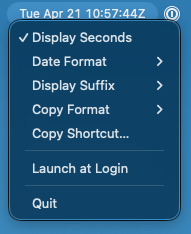
ZuluBar settings menu

For logs

Stop translating timestamps.

Keep UTC visible while you compare server logs, deploy events, incident notes, and support messages.

For teams

Share one clock.

Use Zulu time as the neutral reference when local time zones make scheduling and debugging harder.

For notes

Copy the format you need.

Paste display time, Unix timestamps, or RFC 3339 values without reaching for another tool.

Designed for production work

A small utility for moments where time has to be unambiguous.

Open source, paid convenience

Same utility. Easier install.

ZuluBar is MIT licensed and fully buildable from source. The paid build removes distribution friction: signing, notarization, and automatic updates are handled for you.

Feature Source Paid
UTC time in the menu bar
One-click and shortcut copy
Display and copy format options
Launch at login
Signed and notarized download
Automatic Sparkle updates
No rebuild needed for routine fixes

Maintained in public

MIT source. No accounts. No telemetry.

Every line is on GitHub. There is no analytics layer, no usage tracking, and no hosted account system. Build it from source for free, or buy the signed build and back the person keeping it working.

View source on GitHub

Skip the twenty minutes.

Five dollars. Signed build. Auto-updates. Maintained by one person who uses it every day and intends to keep going.

Purchase — $5